![amperecloud_logo_bgwhite-1.png]](https://knowledge.ampere.cloud/hs-fs/hubfs/amperecloud_logo_bgwhite-1.png?height=40&name=amperecloud_logo_bgwhite-1.png)
You can easily activate Dark Mode in the amperecloud platform in your profile.
How to proceed:
-
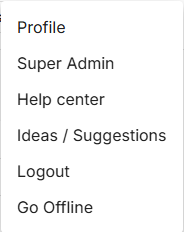
Click on your initials in the circle in the top right corner.

-
Select “Profile” from the dropdown menu.
-
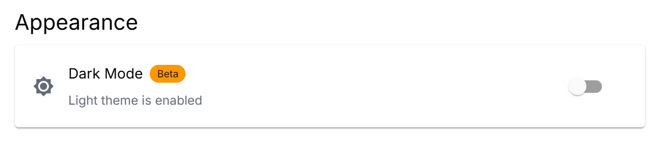
In your profile, you will find a toggle for the display settings.
-
There, switch between Light Mode and Dark Mode.
The change is applied immediately and adjusts the appearance of the platform accordingly.
Need More Help?
If you encountered any difficulties or need further assistance, here are some steps you can take:
Contact Support:
- Email: Reach out to our support team by emailing us at support@amperecloud.com. Provide as much detail as possible about the issue you're facing.
- Fill out a form: Complete our online support form. Please include all relevant information about your request, and our team will get back to you as soon as possible.
Share Your Feedback
If this article didn’t meet your needs or if you have suggestions on how we can improve, please let us know by submitting feedback. Your input helps us enhance our resources and support.