![amperecloud_logo_bgwhite-1.png]](https://knowledge.ampere.cloud/hs-fs/hubfs/amperecloud_logo_bgwhite-1.png?height=40&name=amperecloud_logo_bgwhite-1.png)
Facilities that participate in direct marketing are equipped with a Direct Marketing Interface (DVM). This interface allows an active power limitation to be set for the Facility.
Under normal operation, the active power is controlled by the direct marketer.
For testing purposes, the power limit can also be set by Amperecloud and its customers, provided that they have access to the Facility's Digital Twin.
Accessing the Active Power Limitation
To test the power limitation, please proceed as follows:
-
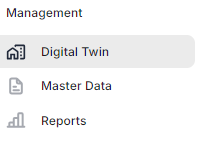
Open the Digital Twin at the system level.
-
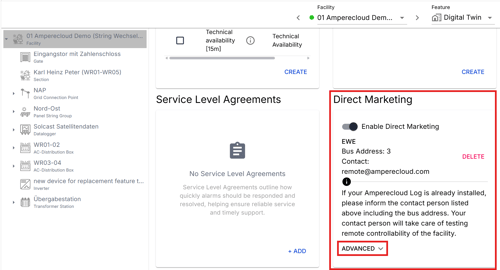
Scroll down to the “Direct Marketing” section.
-
Click “Advanced”. There you will find the user interface of the direct marketing interface.
-
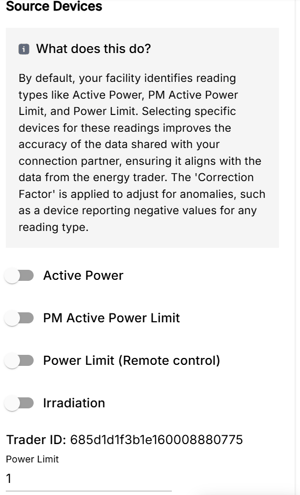
At the bottom of the page, you can set the power limit.
Meaning of the Values
For testing, the following values are typically used:
-
1 → 100% power
-
0 → 0% power
If no control is currently active, the power limit is set to 1 by default (full power).
Test Procedure for a Visible Curtailment
If you would like to see a curtailment and ramp-up curve in the diagram, the order of the inputs is important.
Curtailment
-
First save the value 1.
-
Then change the value to 0 and save again.
Ramp-up
-
First save the value 0.
-
Then change the value to 1 and save again.
Following this procedure ensures that the power change is triggered correctly and displayed accordingly in the diagram.
Need More Help?
If you encountered any difficulties or need further assistance, here are some steps you can take:
Contact Support:
- Email: Reach out to our support team by emailing us at support@amperecloud.com. Provide as much detail as possible about the issue you're facing.
- Fill out a form: Complete our online support form. Please include all relevant information about your request, and our team will get back to you as soon as possible.
Share Your Feedback
If this article didn’t meet your needs or if you have suggestions on how we can improve, please let us know by submitting feedback. Your input helps us enhance our resources and support.